Working with metadata is one of the most important parts of Salesforce development. In larger Salesforce editions, teams often use Change Sets to move metadata between orgs. But in a Developer Edition Org, Change Sets are not available. That leaves developers with one powerful option: the Salesforce CLI (SFDX CLI).
The CLI makes it possible to retrieve, edit, and deploy metadata quickly and reliably. Even in a single Developer Org, it helps build habits that prepare developers for team projects and real-world DevOps workflows.
Why Use Salesforce CLI?
As a beginner, I quickly realized that:
1. Using the Developer Console for coding is limited and slow.
2. Copy-pasting code into the browser editor isn’t practical.
3. CLI gives me faster deployments and a better workflow.
4. It also helps me practice skills that I’ll need later for real projects.
Step 1: Connect Your Developer Org
To connect the CLI with your org:

1. A browser window will open → log in with your Developer Org credentials.
2. The -a DevOrg is just an alias (nickname) so you don’t have to type your email every time.

Step 2: Retrieve Metadata
To pull all Apex Classes into your local project:

Or retrieve a specific one:


Step 3: Edit Locally
Once retrieved, the code appears in the force-app folder inside VS Code. Here you can open the file, edit the logic, or create new classes.

Step 4: Deploy Metadata Back
After making changes, deploy them back to your org:

Or deploy everything at once:


Step 5: Run Tests
It’s always a good habit to validate your changes. Run tests like this:


Common Issues I Faced
1. Login not working → I ransf org logout --target-org DevOrg and logged in again.
2. Spelling mistakes → Sometimes I typed the wrong class name. Using
sf project retrieve start --metadata ApexClass (all classes) fixed it.
3. Deployment errors → Running the command with --verbose helped me see detailed error messages.
Quick Command Cheat Sheet
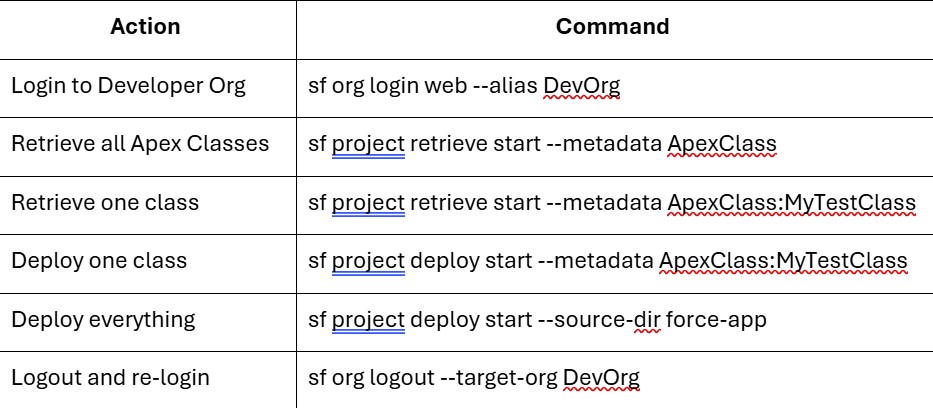
As a learner, Salesforce CLI has made my practice much smoother. Instead of wasting time copy-pasting code in the browser editor, I can now retrieve, edit, and deploy metadata in just a few steps. Even though I only use a Developer Org, I’m already building the habits that professionals use in real Salesforce projects.