Mobile Assessment Canvas App for a UK Plumbing Certification Organisation
Executive Summary
XYZ is a membership organisation for plumbers in the United Kingdom. Its members apply to become certified for installing renewable technologies such as Heat Pumps, Solar Systems, and similar technologies.
Before achieving certification, each member’s installations must be inspected by an XYZ Assessor, who evaluates the systems and workmanship on-site.
To modernise this process, XYZ required a mobile, user-friendly app that would allow assessors to:
• Record answers to technology-specific questions,
• Capture and upload photos during site visits,
• Create non-conformity records where issues are found, and
• Operate offline in remote areas without internet access.
The new Canvas App fulfils all these needs — enabling assessors to conduct, document, and submit assessments directly from their mobile devices while integrating seamlessly with Microsoft Dynamics 365 CRM for centralised data management and reporting.
Problem Faced by XYZ and Limitations of Their Existing Setup
Before implementing the new solution, XYZ already had a Model-Driven App in Dynamics 365 named Assessors, designed to manage:
• Applications,
• Technology Assessments,
• Technology Questions, and
• Non-Conformities.
While the system contained the required data model and process flow, it presented significant usability challenges for field assessors.
Issues Identified:
• The Model-Driven App interface was not user-friendly for mobile or field usage.
• Assessors had to open individual Technology Question records to input responses, which was time-consuming.
• There was no simple mechanism to capture or upload photos directly to SharePoint.
• Non-conformity records had to be created manually, with no automated or contextual quick-create functionality.
• The app required a constant internet connection, creating challenges for field assessors working in remote locations.
To address these usability concerns, XYZ explored a third-party solution—a web-based auditing app with a mobile-friendly interface. However, GoAudit lacked integration with Dynamics 365, meaning that responses and data could not be stored or analysed within XYZ’s existing CRM environment, which is a key business requirement. This prevented centralised data management.
Solution: Canvas App Integrated with Dynamics 365 CRM
After analysing XYZ’s requirements and challenges, our team proposed developing a Power Apps Canvas App designed specifically for field assessors. We designed the user-friendly layout of the Canvas app, ensuring seamless integration with Dynamics 365 and SharePoint.
Solution Highlights
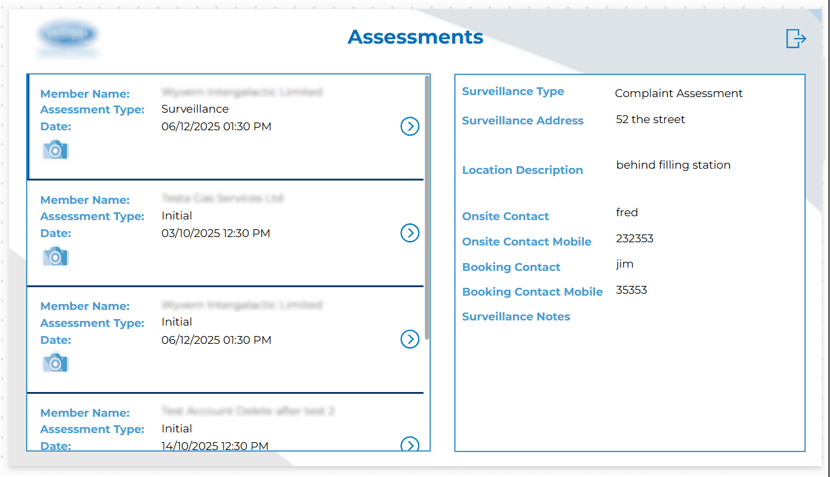
• Canvas App Interface: A clean, intuitive, mobile-first interface allowing assessors to perform end-to-end assessments on tablets or mobile devices.
• End-to-End Integration: The app directly connects to Dynamics 365 entities such as Applications, Technology Assessments, and Non-Conformities.
• Offline Functionality: Assessors can record findings even without an internet connection, with data syncing automatically once online.
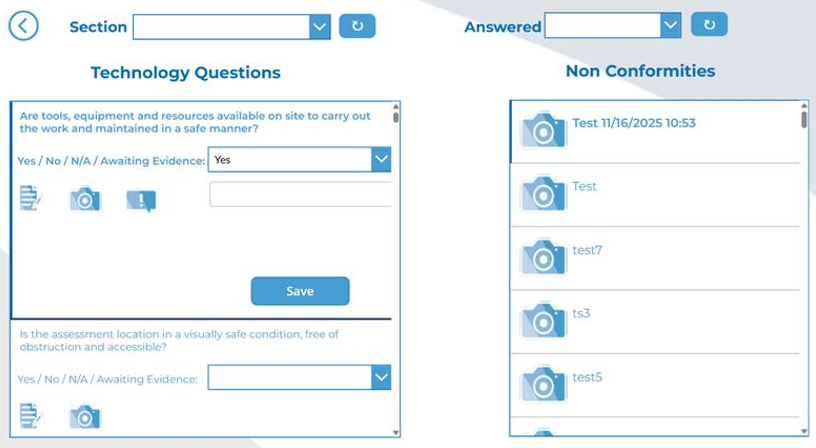
• Smart Question Flow: Questions are dynamically loaded based on the selected technology type (e.g., Heat Pumps, Solar Systems).
• Conditional Logic: Depending on responses, the app automatically creates non-conformity records via Quick Create forms.
• Photo Upload to SharePoint: Assessors can capture and upload photos directly against specific questions or non-conformities, stored securely in SharePoint.
Functionality and Workflow of the Accessor App
1. Assessment Application Process
• Assessments begin as Applications manually created within the Model-Driven App for each customer account.
• XYZ administrators select work areas (e.g., Heat Pumps, Solar Systems) and specify assessment details such as:
• Location,
• Date and time, and
• Assigned assessor.
2. Automatic Assessment Creation
• A workflow in Dynamics 365 automatically generates related Assessment records based on application details.
• The assigned assessor receives the assessment in the Canvas App, ready for review and completion.
3. Assessment Execution via Canvas App
• Assessors open their assigned assessment on mobile/tablet devices.
• The Canvas App displays a clean, structured list of questions relevant to the selected work area.
• Depending on the response:
• A non-conformity record can be automatically created through a quick-create form.
• The assessor can capture photos or supporting documents and upload them to SharePoint directly from the app.
• The app supports offline mode, allowing assessors to continue working without internet connectivity and sync data once online.
4. Workflow and Data Capture
Once saved, the system:
• Triggers the appropriate workflows,
• Populates relevant Technology Assessment Questions,
• Links them to the correct Application record,
• Stores all data securely in Dynamics 365 and associated SharePoint libraries, and
• Ensures assessments and non-conformities are reportable and traceable by XYZ’s back-office staff.
Key Features of the Canvas App
Mobile-Optimised User Interface
- • A simplified and intuitive interface tailored for field users.
- • Seamless navigation through questions and sections without opening multiple records.
Dynamic Question Management
- • Automatically loads technology-specific questions based on the selected work area.
- • Supports branching logic to trigger non-conformities based on specific answers.
Integrated Photo Capture and Storage
- • Direct camera access for photo capture.
- • Automatic upload to SharePoint, linked to the corresponding question for the selected account.
Automated Non-Conformity Creation
- • Quick-create forms appear when answers indicate a compliance issue.
- • Non-conformities are automatically associated with the relevant assessment and technology.
Offline Capability
- • Complete offline access to assigned assessments, allowing uninterrupted work in low-connectivity areas.
- • Data syncs automatically when internet access resumes.
Seamless D365 Integration
- • All captured data — including photos, answers, and non-conformities — is synchronised with Dynamics 365 for analysis, reporting, and audit trail.
Client Benefits
By implementing the new Canvas App, XYZ achieved the following outcomes:
- • Improved Field Efficiency: Assessors can now complete inspections faster, without navigating multiple CRM records.
- • User-Friendly Interface: Optimised layout for tablets and mobile devices.
- • Offline Access: Full functionality even in areas without internet connectivity.
- • Data Accuracy & Integration: Real-time synchronisation with Dynamics 365 ensures centralised data management.
- • Enhanced Reporting: All assessment data, photos, and non-conformities are easily accessible for analysis.
- • Reduced Training Time: Simplified the UI, reducing onboarding time for assessors.
Conclusion
By successfully implementing the Dynamics 365-integrated Canvas App, XYZ has significantly enhanced its field assessment process.
Assessors now benefit from a simplified, mobile, and offline-enabled system — ensuring consistent data capture, faster audits, and full CRM integration.
This digital transformation not only improved operational efficiency but also positioned XYZ as a technology-driven certification authority within the UK plumbing industry.